Sunday, 30 October 2016

Free Up Disk Space on Your Windows 10 PC

Is your Windows 10 hard drive showing signs that it's close to empty? You barely have enough room for your current applications and files, let alone new ones. Sure, hard drives are cheap, so you can always clone your existing one. But let's say you want to first try to get more mileage out of your current drive. There are a few ways you can do this.

The first and most obvious task is to delete files you no longer use. Granted, this chore will likely take a while since you may bump into hundreds or thousands of files you no longer need. To do this, open File Explorer, jump to the folders that contain your documents and other personal files, sort your files by modified date with the oldest ones appearing first, and then simply scrap the old and unneeded ones.

Another method to put the kibosh on unneeded files in Windows 10. Click on the Start button and then select Settings > System > Storage. Click on your main hard drive at the top of the window. Windows 10 calculates the types of files on your drive and how much space they take up. Click on a particular file type such as Documents, Pictures, or Music.

Empty your Recycle Bin. By default, any file you delete remains on your hard drive via the Recycle Bin so you can recover it if necessary. But at some point, the bin will get big, so you'll want to prune it. You can double-click on the Recycle Bin to view and delete any individual files you no longer need, or you can right-click on the Recycle Bin icon and click on the Empty Recycle Bin command to purge all the files within.

 The Windows Disk Cleanup tool can get rid of a whole mess of files in one shot. Click on the Start button and scroll down the Apps list, open the Windows Administrative Tools folder, and then select Disk Cleanup. The Disk Cleanup tool displays a series of file categories and determines how much space you can free up per category. Click on each category to view a description. In some cases, you can also view the files in that category. Click on the checkmarks next to the categories you feel comfortable deleting and then click the OK button.

Source & more info: PC Magazine

Tuesday, 18 October 2016

Barracuda's blacklist - keep out

Barracuda Spam Firewall is a popular spam filtering software. One of the ways it figures out whether an email is Spam or not is through the use of its "Intent Engine". The "Intent Engine" is a human run and maintained blacklist which is turned "On" by default with each new Barracuda installation.
To get blacklisted inside the "Intent Engine" you must first have had a complaint submitted to Barracuda by one of its customers. By default Barracuda assumes all mail is good mail, until that initial complaint is filed. Once a complaint is filed, a person will look at your email for three attributes to determine if it belongs on the blacklist.
  1. "To:" line cannot be obfuscated. Anyone who uses blind carbon copy line (BCC line) to load up a list of recipients would fail this test.
  2. The email must let the recipient know how they got on the email list inside the body of the message.
  3. There must be a one-click unsubscribe link.
If the email fails in any of these areas, then the person analyzing the email will add URLs that are linked to in the email to the blacklist which means that future emails sent by that sender could be blocked. Once your URL gets on the blacklist, any Barracuda customer who has the "Intent Engine" turned on will likely not receive your messages.

We encourage our customers to add a quick one-line explanation to the body of their messages that explain how and where permission was gained from the customer to be on your list. This line can be in the header or the footer of the message. Not only would this help with deliverability, but it would also help make transparent your relationship with the end recipient which is always a good thing.

source: Campaigner
read more: Barracuda Lookup

Barracuda's blacklist - keep out

Barracuda Spam Firewall is a popular spam filtering software. One of the ways it figures out whether an email is Spam or not is through the use of its "Intent Engine". The "Intent Engine" is a human run and maintained blacklist which is turned "On" by default with each new Barracuda installation.
To get blacklisted inside the "Intent Engine" you must first have had a complaint submitted to Barracuda by one of its customers. By default Barracuda assumes all mail is good mail, until that initial complaint is filed. Once a complaint is filed, a person will look at your email for three attributes to determine if it belongs on the blacklist.
  1. "To:" line cannot be obfuscated. Anyone who uses blind carbon copy line (BCC line) to load up a list of recipients would fail this test.
  2. The email must let the recipient know how they got on the email list inside the body of the message.
  3. There must be a one-click unsubscribe link.
If the email fails in any of these areas, then the person analyzing the email will add URLs that are linked to in the email to the blacklist which means that future emails sent by that sender could be blocked. Once your URL gets on the blacklist, any Barracuda customer who has the "Intent Engine" turned on will likely not receive your messages.

We encourage our customers to add a quick one-line explanation to the body of their messages that explain how and where permission was gained from the customer to be on your list. This line can be in the header or the footer of the message. Not only would this help with deliverability, but it would also help make transparent your relationship with the end recipient which is always a good thing.

source: Campaigner
read more: Barracuda Lookup

Barracuda's blacklist - keep out

Barracuda Spam Firewall is a popular spam filtering software. One of the ways it figures out whether an email is Spam or not is through the use of its "Intent Engine". The "Intent Engine" is a human run and maintained blacklist which is turned "On" by default with each new Barracuda installation.
To get blacklisted inside the "Intent Engine" you must first have had a complaint submitted to Barracuda by one of its customers. By default Barracuda assumes all mail is good mail, until that initial complaint is filed. Once a complaint is filed, a person will look at your email for three attributes to determine if it belongs on the blacklist.
  1. "To:" line cannot be obfuscated. Anyone who uses blind carbon copy line (BCC line) to load up a list of recipients would fail this test.
  2. The email must let the recipient know how they got on the email list inside the body of the message.
  3. There must be a one-click unsubscribe link.
If the email fails in any of these areas, then the person analyzing the email will add URLs that are linked to in the email to the blacklist which means that future emails sent by that sender could be blocked. Once your URL gets on the blacklist, any Barracuda customer who has the "Intent Engine" turned on will likely not receive your messages.

We encourage our customers to add a quick one-line explanation to the body of their messages that explain how and where permission was gained from the customer to be on your list. This line can be in the header or the footer of the message. Not only would this help with deliverability, but it would also help make transparent your relationship with the end recipient which is always a good thing.

source: Campaigner
read more: Barracuda Lookup

Tuesday, 20 September 2016

Ammyy Admin Website Compromised

The website of the Ammyy Admin remote desktop management tool has been compromised to spread malware for the God-knows-what time in the past year.

Softpedia detected that something was wrong after we started receiving worrisome comments from readers on two articles detailing past infections of the Ammyy Admin website.

 Ammyy Admin website compromised for at least two days

The contaminated Ammyy Admin file MalwareHunterTeam managed to obtain had been uploaded on VirusTotal 20 times by 19 different people, between 2016-09-14 07:47:04 and 2016-09-15 06:50:39.
Some users have the habit of double-checking downloaded files by scanning them using VirusTotal. The period above is most likely the interval during which the website had been compromised, and some of its users had scanned the file.
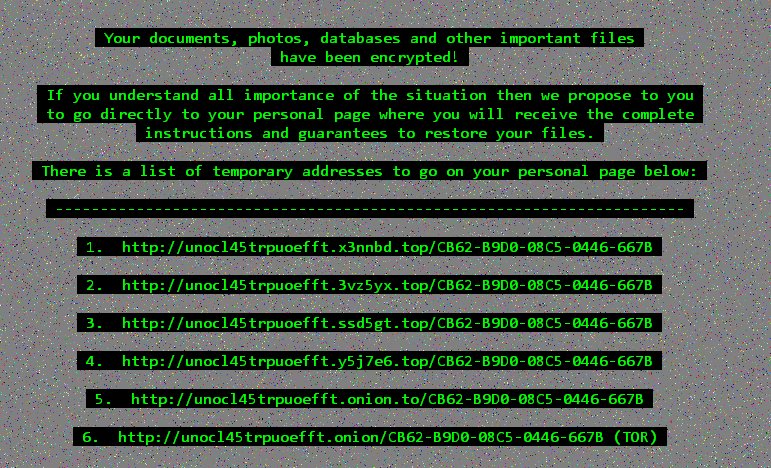
A hybrid analysis of the file reveals a binary called "encrypted.exe" packed with the original AA_v3.exe, the legitimate installer. Every user running the installer would also run this file, which installs the Cerber ransomware.
Ammyy Admin website serving latest version of the Cerber ransomware
Cerber, which appeared at the start of the year, had several major branches, some of which were cracked and security researchers created a free decrypter to help victims recover their files.
The version distributed via the Ammyy Admin installer packs the latest v3 version that locks files via the .cerber3 extension. This version is uncrackable, at the time of writing.
Cerber 3 ransom note
MalwareHunterTeam also said that he didn't inform the website admin of the compromise and that it stopped on its own. Either the crooks realized they were exposed or they're just preparing another version of the Ammyy installer that would spread other types of malware.

Ammyy Admin website has spread at least six other types of malware

In the past, both ESET and Kaspersky have put out reports about how the site was used to spread all sorts of malware, such as the Ranbyus, Lurk and Buhtrap banking trojans, the CoreBot and Fareit infostealers, and the NetWire RAT.
ESET reported that the Ammyy Admin website spread malware in October and November 2015, while Kaspersky reported numerous similar incidents that took place between February to July 2016.
Softpedia has reached out to Ammyy Admin's team for additional comments. At the time of writing, even if Ammyy Admin downloads are clean, we can't vouch that they'll stay this way, taking into account the website's track record.

Wednesday, 31 August 2016

Keep your DATA PRIVATE - Encfs Manager in Ubuntu, Windows or Mac

Features of EncFSMP:
  • Mounts EncFS folders on Windows and OS X
  • Can create, edit, export and change the password of EncFS folders
  • Is 100% compatible with EncFS 1.7.4 on Linux
  • Completely free, no nags, no additional downloads like toolbars etc.
With EncFS MP, you can store your data in an encrypted folder (works for usb memory sticks as well). This is especially important if you store your sensitive data in a cloud service like Dropbox or Google Drive.Since EncFS exists on many platforms, you can access your data from a Windows PC, from an Apple computer, from Linux (using the built-in EncFS), or even from an Android device (using Cryptonite).Although EncFSMP is an open source project and its source code is released under the MIT license, it contains a closed-source component. The file system component that allows EncFSMP volumes to be mounted is called Pismo File Mount and is developed by Pismo Technic Inc.. Other than that, EncFSMP is 100% open source.


Windows or Mac

Download the (open source) software from Encfs official site

Ubuntu Linux

To add the official GNOME Encfs Manager PPA and install the application in Ubuntu, use the following commands in terminal:
sudo add-apt-repository ppa:gencfsm/ppasudo apt-get updatesudo apt-get install gnome-encfs-manager


Monday, 8 August 2016

You Can Still Get Windows 10 for Free

The free Windows 10 upgrade offer may technically be over, but it isn’t 100% gone. Microsoft still provides a free Windows 10 upgrade to anyone who checks a box saying they use assistive technologies on their computer. This offer will end at some point, but Microsoft hasn’t announced when.
Microsoft has announced that it wants people who use assistive technologies to be able to upgrade to use the new accessibility features in Windows 10’s Anniversary Update.
This free upgrade works just like Windows 10’s previous upgrade offer. In fact, it seems to be the exact same upgrade tool. Upgrading gives your PC a “digital license” (formerly a “digital entitlement”) that allows you to install and use Windows 10 on that PC, even after the free upgrade offer ends for new upgraders.

How to Upgrade to Windows 10 from the Accessibility Page

The free upgrade offer is simple. To get Windows 10, you’ll just have to visit the “Windows 10 free upgrade for customers who use assistive technologies” page and download the upgrade tool. Like the previous free upgrade offer, this only works if your computer is currently running Windows 7 or Windows 8.1. (If you’re using Windows 8, you can get a free upgrade to Windows 8.1 and then upgrade to Windows 10.)
Once the upgrade is complete, your PC will be running Windows 10 and will have a “digital license” that lets you reinstall Windows 10 at any point in the future.
This probably won’t last forever. However, Microsoft says it will issue a public announcement before the upgrade offer ends.
source and more information: howtogeek.com